Remove Extra Spaces From Text Online
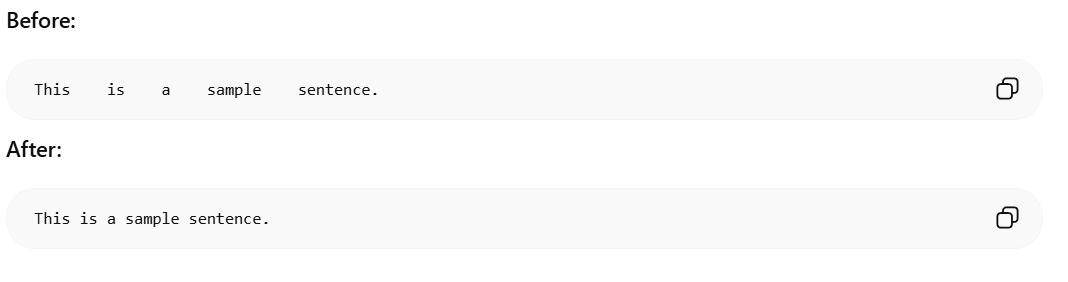
Our remove extra spaces tool helps you clean text quickly without changing your words or message. If you copy content from documents, chat apps, or websites, random spacing often appears and makes text look messy. This free online text cleaner removes duplicate spaces, trims leading and trailing whitespace, and turns cluttered writing into a clean paragraph you can reuse anywhere. It is useful for students editing assignments, writers polishing drafts, marketers preparing captions, and developers formatting sample content. You can paste any sentence, paragraph, or long block of text into the input area and click once to get a cleaner output. Because this text formatting tool runs in the browser, it is fast and easy to use for daily work. Use it before posting on social media, sending emails, publishing blog content, or saving notes. When you need a simple whitespace remover that improves readability in seconds, this tool is a reliable option.
Output
Your cleaned text will appear here.
What Is the Remove Extra Spaces Tool?
Common Use Cases
Clean Text Copied From PDFs
Text copied from PDF files often contains inconsistent spacing. This tool quickly fixes formatting issues.
Improve Article Formatting
Content writers and bloggers can clean drafts before publishing articles online.
Prepare Academic Documents
Students can remove unnecessary spaces from essays, assignments, and research papers.
Clean Email Content
Text copied from emails sometimes contains extra spaces that affect readability.
Format Website Content
Webmasters and SEO professionals can prepare cleaner content for websites and landing pages.
Improve Readability
Proper spacing makes documents easier to read and more professional.
Examples
🔒 Privacy First
This tool runs entirely in your browser. Your text is never sent to any server.
How to Use Remove Extra Spaces From Text Online
- 1Paste or type your text into the input area above
- 2Click the action button to process your text
- 3Copy the result and use it anywhere
Why Use This Remove Extra Spaces From Text Online?
- ✓100% free with no hidden costs or subscriptions
- ✓No sign-up or account required
- ✓Your data stays private - processed only in your browser
- ✓Fast results with instant processing
- ✓Works on desktop, tablet, and mobile devices
Frequently Asked Questions
What does this remove extra spaces tool do?▼
It removes repeated spaces and extra line breaks, then trims spaces at the beginning and end of your text.
Will this tool change my words or punctuation?▼
No. It only cleans whitespace so your wording and punctuation stay exactly the same.
Can I use this tool for long text?▼
Yes. You can paste short or long content, then clean it with one click.
Does the space remover store my text?▼
No. This tool runs entirely in your browser. Your text is never sent to any server or stored anywhere.
Is this text cleaner free?▼
Yes, it is completely free to use with no registration or sign-up required.