JSON Formatter Online
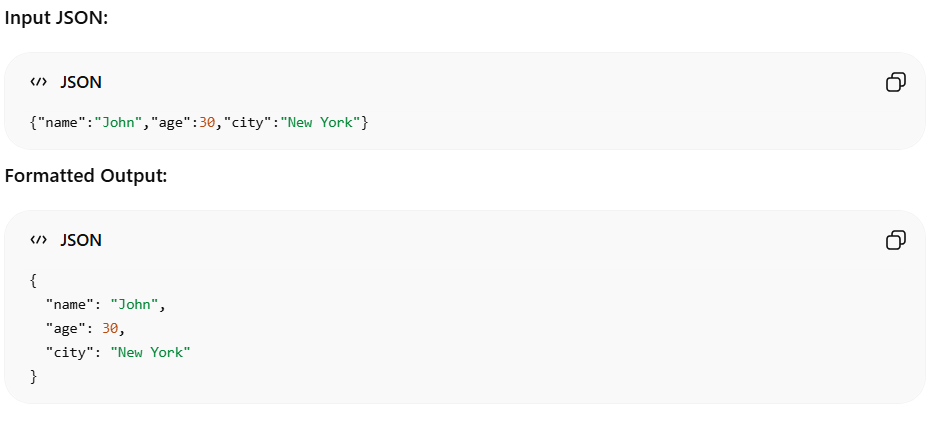
Our free online JSON formatter is the perfect tool for developers, data analysts, and anyone who needs to read, clean, or validate JSON data. When you receive raw JSON from APIs or server logs, it often comes minified as a single, unreadable line of text. This tool instantly converts messy JSON strings into beautifully structured, easy-to-read code with proper indentation and line breaks. Simply paste your JSON data into the input box and click the format button. The tool will parse your code and output a clean, standardized format. If there are syntax errors in your data, the tool will catch them and display an error message to help you debug. Best of all, this utility runs entirely on your local browser, meaning your sensitive data is completely private and never uploaded to any external servers.
Formatted JSON
Your beautifully formatted JSON will appear here.
What Is the JSON Formatter Online Tool?
Common Use Cases
API Development
Developers can format API responses to make them easier to read and debug.
Debugging JSON Errors
Quickly identify missing brackets, commas, or incorrect syntax.
Database Management
View and organize JSON data stored in databases.
Data Analysis
Analyze structured JSON data more efficiently.
Configuration Files
Improve readability of application and server configuration files.
Software Testing
Inspect API responses and verify data structures during testing.
Examples
🔒 Privacy First
This tool runs entirely in your browser. Your text is never sent to any server.
How to Use JSON Formatter Online
- 1Paste or type your text into the input area above
- 2Click the action button to process your text
- 3Copy the result and use it anywhere
Why Use This JSON Formatter Online?
- ✓100% free with no hidden costs or subscriptions
- ✓No sign-up or account required
- ✓Your data stays private - processed only in your browser
- ✓Fast results with instant processing
- ✓Works on desktop, tablet, and mobile devices
Frequently Asked Questions
What does a JSON formatter do?▼
A JSON formatter takes minified or unreadable JSON strings and adds proper indentation, spacing, and line breaks to make the data perfectly human-readable.
Is this JSON formatter free to use?▼
Yes, this tool is completely free to use. There are no hidden fees, subscriptions, or limits on how much JSON you can format.
Will it catch JSON syntax errors?▼
Yes. If your JSON is invalid or missing characters like commas or quotes, the tool will fail to parse it and display an error message to help you debug the problem.
Is my JSON data secure and private?▼
Absolutely. All formatting happens locally on your device within your web browser. Your JSON data is never uploaded, saved, or sent to any server.
Can it handle large JSON structures?▼
Yes, the tool is highly optimized and can quickly format large JSON objects or arrays directly in your browser without significant lag.